
Advanced Debug Preview
Use Advanced Debug View to understand AI-driven product rankings with clear insights into popularity, user behavior, relevance, and personalization signals.
Overview
The Advanced Debug View provides a transparent, explainable view of how products are ranked in Search and Browse results. For every product, it breaks down which algorithms influenced the rank and by how much, helping you understand why a product appears where it does.
This view transforms raw ranking metadata into an intuitive, story-driven dashboard that
- Eliminates guesswork in ranking behavior
- Speeds up debugging, optimization, and customer conversations
- Builds trust in AI-driven ranking decisions
Components of Debug View
Each product card in Debug View includes a Visual Explanation Block with clearly separated ranking components and scores. These factors collectively contribute to the Score (final product score), which determines the product's ranking in search results.
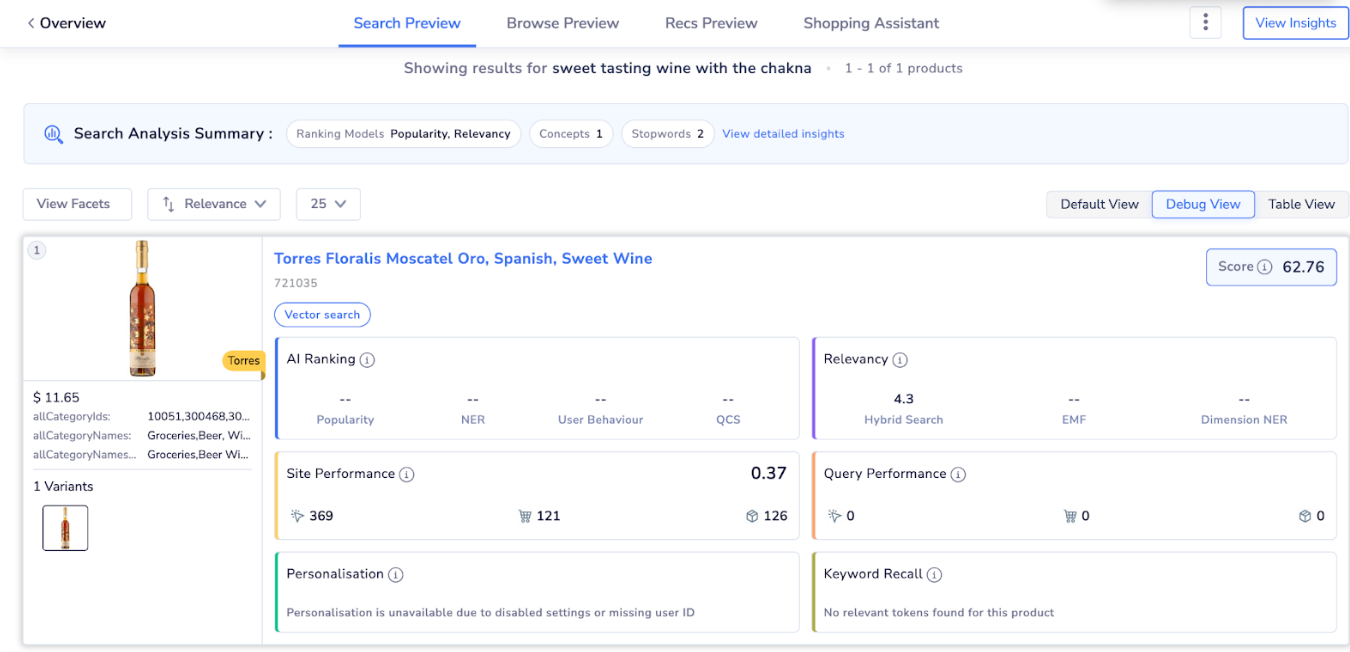
Advanced Debug Preview
AI Ranking
AI Ranking shows the algorithm-based scoring factors applied to this product. It reflects how AI models such as popularity, user behavior, entity recognition, and category prediction contribute to the product’s rank. The following models are included:
- Popularity: Boost based on overall engagement trends
- User Behaviour: Influence from clicks, carts, and orders
- NER (Named Entity Recognition): Entity understanding from product and query
- Query Category Prediction (QCS): Alignment with predicted query category
NoteThis shows how AI models like popularity, user behavior, entity recognition, and category prediction combine to determine the product’s rank.”
Relevancy
Relevancy shows how closely this product matches the user’s search query based on textual and semantic relevance signals. It reflects how keyword matching, semantic understanding, and structured attribute recognition contribute to the product’s relevance score. The following signals are included:
- Hybrid Search: Combined evaluation of keyword-based matching and semantic (vector) similarity
- Exact Match Factor (EMF): Boost for exact query term matches in high-priority fields such as title or brand
- Dimension NER: Matching of structured attributes (for example, category, brand, or product type) extracted from the query
NoteThis section explains how keyword matching, semantic similarity, and entity-based signals work together to determine how relevant a product is to a search query.
Site Performance
Site Performance measures a product’s performance across search and browse visits, reflecting its overall engagement and demand on the site. It reflects how the product performs across Search and Browse experiences.
It is based on overall engagement signals and it helps identify consistently strong or weak products.
Query Performance
Query Performance Score is calculated based on user interactions for the current query, including clicks, cart additions, and orders, to measure engagement. This measures how well the product performs for the current query.
Query Performance is based on query-level clicks, carts, and orders.
Personalisation
This highlights ranking influence from shopper-specific signals. However, the final ranking score is based on user affinity, preferences, and context. It is displayed only when personalisation is enabled, and user data is available.
NoteIf personalization is disabled or user ID is missing, the section indicates that personalization is unavailable.
Keyword Recall
Keyword Recall shows how well this product matches the search query based on hybrid search, exact match fields (EMF), and dimension NER. This explains how closely the product matches the search query based on relevance signals.
When to Use Advanced Debug View
Use Debug View when you want to:
- Explain ranking behaviour to internal teams or customers.
- Debug why a product is ranking higher or lower.
- Validate the impact of AI models and relevance tuning.
- Build confidence in AI-driven search decisions.
Updated 8 months ago