
Workbench : Console Integration for Onboarding
Overview
Workbench is an onboarding platform integrated directly into the Unbxd Console. It enables partners and third-party developers to independently onboard merchants, especially Shopify stores, through guided, automated, and script-driven setup flows.
By moving onboarding into the product experience, Workbench removes manual dependencies on Unbxd teams and significantly reduces time-to-value.
Workbench vs Traditional Onboarding
Since traditional onboarding relies heavily on manual intervention, using workbench helps in:
- Reducing internal Unbxd team involvement.
- Multiple setup steps handled manually.
- Repeated back-and-forth for credentials and configuration.
- Custom hand-holding for each merchant.
This approach does not scale and delays merchant go-live, it transforms onboarding into a self-serve, repeatable, and partner-led workflow.
Key Benefits
| Stakeholder | Key Benefits |
|---|---|
| Merchants (Especially Shopify) |
|
| Partners |
|
| Unbxd |
|
Create New Project
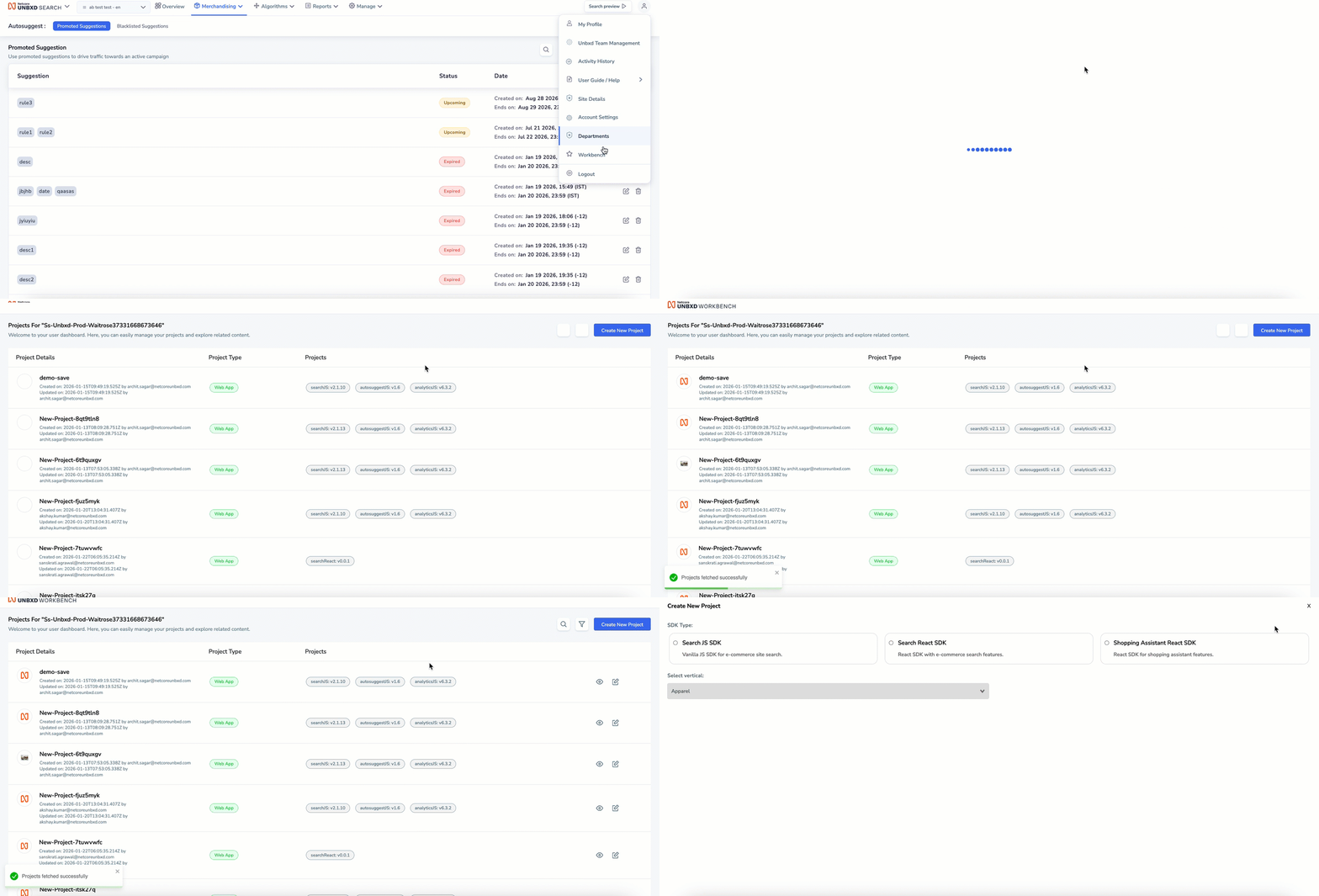
Create New Project
- Log in to the Netcore Unbxd Console and navigate to the Profile section.
- Select Workbench from the menu.
- In the Workbench dashboard, click Create New Project and enter the required project details.
- Click Create Project to proceed.
Once created, the project can be used to manage onboarding credentials and scripts for merchant setup.
Updated 8 months ago