
Experience
Manage and Analyze Recommendation Experiences in Unbxd
An Experience is a combination of a custom algorithm and a page type. Every web page in your store can be one of these page types:
- Home Page
- Product Display Page
- Category Page
- Cart Page
- Brand Page
- Boutique Page
- AI Complete the Look
- Journey Page
- Broadcast Page
Based on the page type, you can create an Experience that assigns a set of curated and relevant products for each page.
The Experiences page allows you to design and manage recommendation campaigns (called Experiences) for your website. Each experience defines where a recommendation widget appears, how it looks, and which algorithm powers the recommendations.
The Manage Experience page provides a unified view of all your saved recommendation experiences. You can analyze their performance from this page and create or edit experiences.
Access Experience
Log in to your Netcore Unbxd Recommendation panel and click Experience to manage the recommendation widgets. Navigate to the Manage Experience to view the list of experiences.
Refer to the table to know more about the listing headers:
| Header | Description |
|---|---|
| Experience Name | Displays the experience name as defined during setup. |
| Status | Indicates the current state of the experience. |
| Algorithm | Displays the recommendation logic that powers the experience. For example, Top Sellers, Frequently Bought Together, and so on. |
| Performance Metrics | View key performance indicators (KPIs) for the selected experience over the past 30 days. The metrics available here are:
|
Functionality
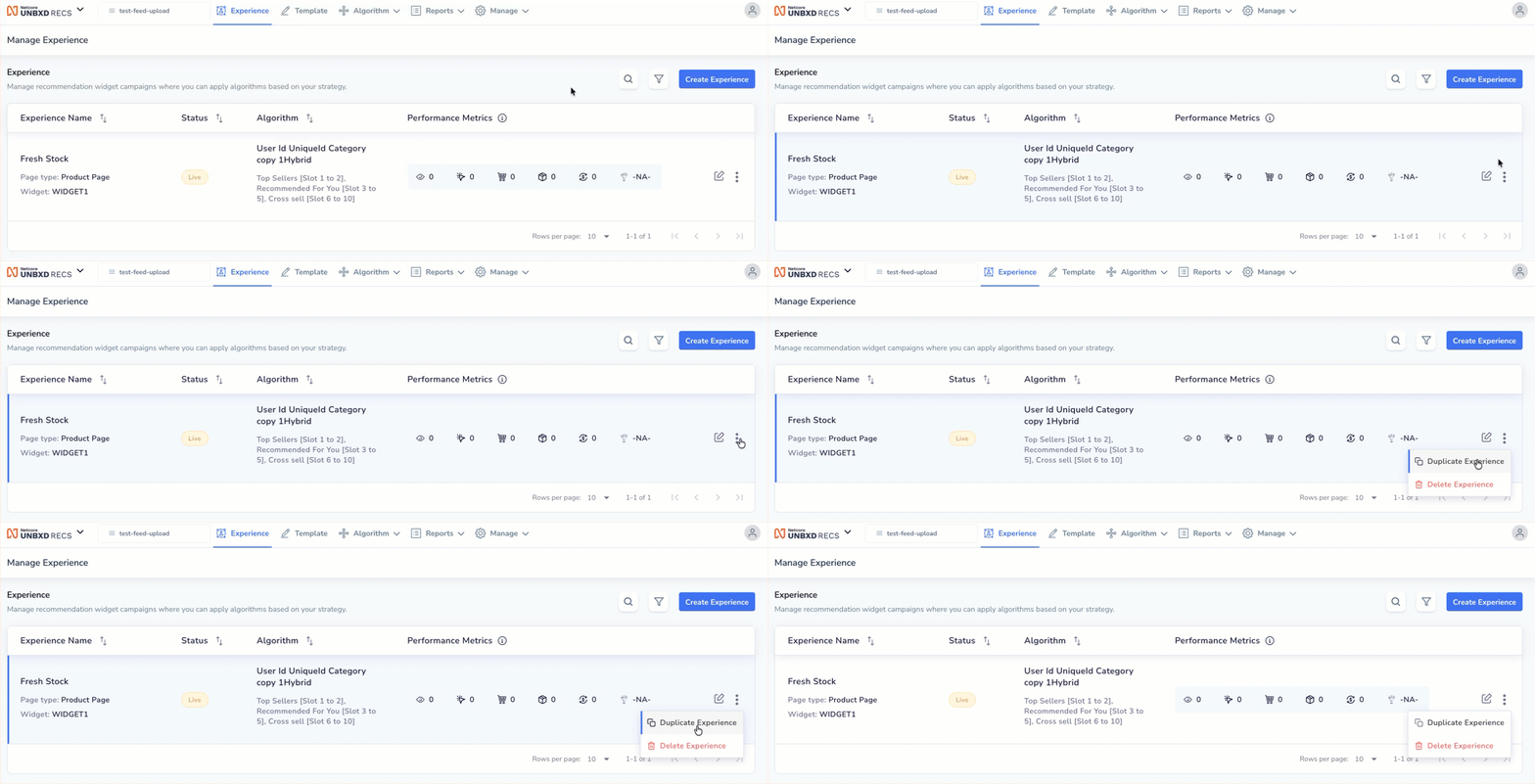
Edit, Delete, or Duplicate Experience
Refer to the table below for the available functionalities on the Manage Experience page.
| Element | Description |
|---|---|
| Search | Click  to find a specific experience by name. to find a specific experience by name. |
| Filter | Click  to view experiences by page type, widget, or status. to view experiences by page type, widget, or status. |
| Edit Experience | Click the edit icon to modify an existing experience. |
| Duplicate Experience | Click  > >  to create a copy of an existing experience. This is useful when you want to reuse the same setup with minor changes. to create a copy of an existing experience. This is useful when you want to reuse the same setup with minor changes. |
| Delete Experience | Click >  to permanently remove an experience from the list. to permanently remove an experience from the list. |
The Performance Metrics section in the Recommendation Console provides a quick summary of your recommendation experiences' performance over the past 30 days.
| Metric | Description |
|---|---|
| Impressions | Number of times the recommendation widgets were displayed to site visitors. |
| Clicks | Number of times visitors clicked on products shown in recommendation widgets. |
| Carts | Number of recommended products that were added to the shopping cart. |
| Orders | Number of orders that included at least one recommended product. |
| Revenue | Total revenue generated from purchases involving recommended products. |
| Conversion Rate | Percentage of impressions that resulted in a product purchase from recommendations. |
PaginationAt the bottom of the section, you can adjust the number of rows displayed per page using the Rows per page dropdown. This helps in viewing metrics for multiple experiences efficiently.
Updated 6 months ago